
Single Sign-On (SSO)
ClassAct II is compatible with multiple single sign-on (SSO) systems allowing your staff and students to quickly and securely sign up or log in to your learning management system.
Supported identity providers and authentication protocols
We currently support the following systems.
- OpenID Connect
- OAuth 2.0
- Microsoft Entra ID
- SAML 2.0
- LTI 1.3
- JWK/JWKS key-based authentication
If the system used by your institution isn’t listed we would be happy to work with you to add it to our growing list of supported formats.
Learning environment implementations
We currently have successful applications using Canvas. If your establishment uses a different learning environment, we would be happy to discuss adding your chosen provider.
Technical Setup Process Overview
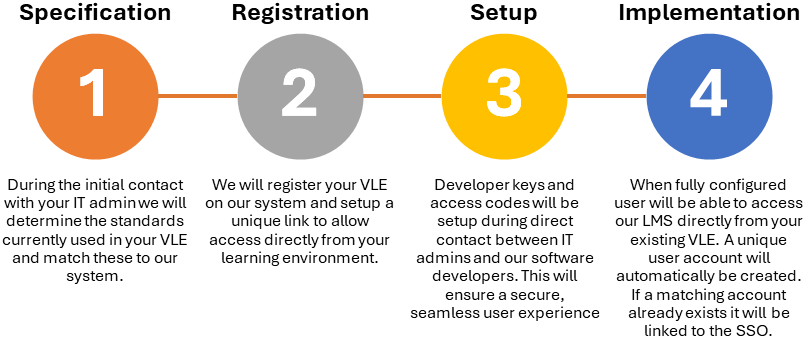 |
Application example using Canvas
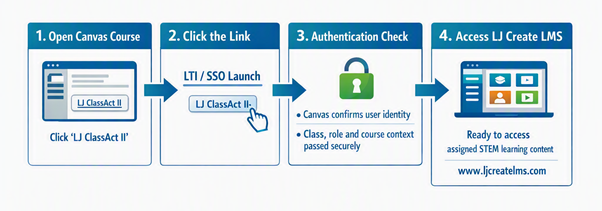
Figure: Example user journey from a Canvas course link into LJ ClassAct II. Once configured, Canvas can present the LJ ClassAct II link as an external tool or course link, launch the secure authentication flow, and pass the relevant user and course context to the LMS.
How the Canvas link works
- Canvas displays an LJ ClassAct II link within the course, module, navigation area, or another agreed placement.
- The user selects the link from Canvas, starting the configured LTI 1.3 or SSO launch.
- Canvas confirms the user’s authenticated session and sends the agreed launch details securely to LJ ClassAct II.
- LJ ClassAct II opens at www.ljcreatelms.com, giving the user access to the relevant learning content without needing to sign in again.
Next steps
If you would like to investigate using ClassAct II with SSO please contact your local representative who can arrange contact with our software developer. We can provide you with example query strings, configurations, decode/response payloads etc. and advise you with options.